What's happening?
Going forward, you can make online payments using a PCU virtual card, without needing your physical card.
More about virtual card:
A virtual card is a digital form of your debit card. When you use your card for an online purchase, your virtual card produces a dynamic CVV through your mobile app to reduce card fraud. The card is only viewable in your PCU mobile banking app, which only you have access to, providing a safer way to make purchases.
How to view your virtual card:
Step 1.
Proceed to checkout for your online purchase.
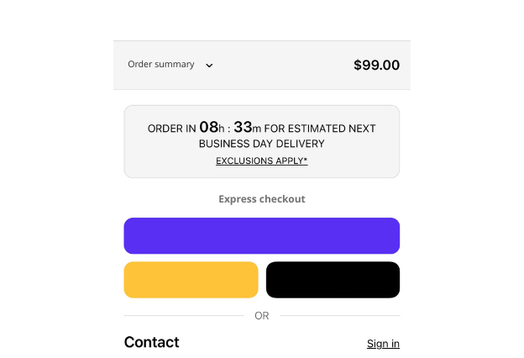
Step 2.
Log in to your PCU mobile banking app and select 'Services'.
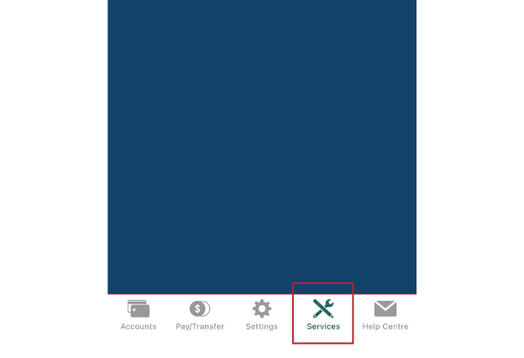
Step 3.
Select 'Manage Cards'.
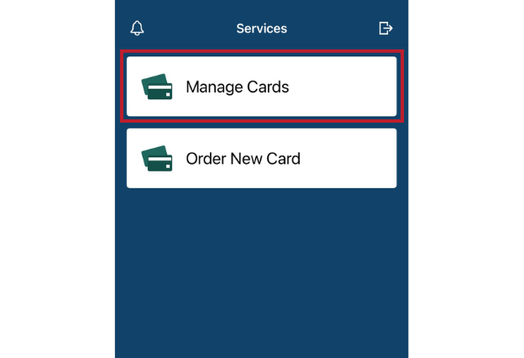
Step 4.
Click on your PCU debit card for details.
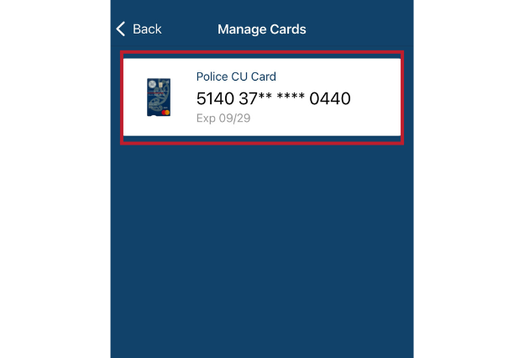
Step 5.
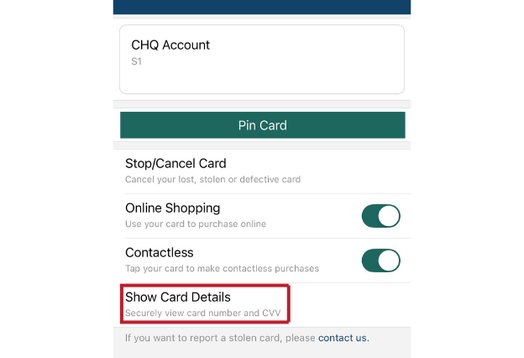
Select 'Show Card Details' to securely view card number and CVV.
FAQ'S
Q. My new card hasn't arrived, can I use this one?
A. Yes, you can use your virtual card for online purchases as soon as your card has been ordered - you don't need to wait until your physical card arrives.
Q: How is a virtual card different from a physical one?
A: You don't require your physical card to make an online payment, and only you can access your card on your app on your phone.
Q: What is a dynamic CVV?
A: A dynamic CVV changes regularly, whereas with a physical card, your CVV is always the same.
Q: How does it work if I have a physical card CVV and a virtual card dynamic CVV?
A: Your dynamic CVV or your physical CVV will work for your online payments as the method for online purchases.
Q: Are virtual cards safe?
A: Yes, they often are safer than physical cards:
- Not visible or easily stolen
- Can be locked instantly
- Dynamic CVV adds extra protection
Q: What happens if I lose my phone?
A: You're still protected as the app requires your login or biometrics. You can call us on 0800 429 000 if you lose your phone.